


首先我们来看一下 Android N 支持的视频文件有哪些。Android N 支持的视频格式下表所示。
| 格式/编码 | 支持的文件类型 |
|---|---|
| H.263 | 3GPP(.3gp);MpEG-4(.mp4) |
| H.264 AVC | 3GPP(.3gp);MpEG-4(.mp4) MPEG-TS(.ts,AAC audio only,not seekable,Android 3.0+) |
| MPEG-4 SP | 3GPP(.3gp) |
| VP8 | WebM(.webm);Matroska mkv |
视频播放器
与音频播放相比,视频播放需要使用视觉组件将影像显示出来。
在 Android SDK 中提供了多种播放视频文件的方法。例如,可以用 VideoView 或 SurfaceView 来播放视频,其中使用 VideoView 组件播放视频最为方便。
实例 VideoPlayDemo 演示了使用 android.widget.VideoView 组件进行视频播放的方法,运行效果如图 1 所示。
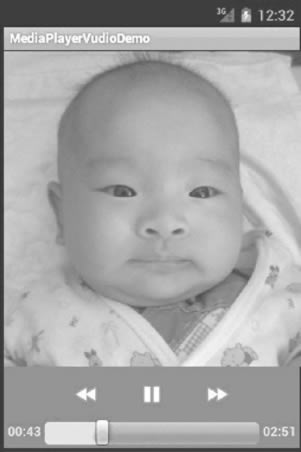
图 1 VideoPlayDemo 的运行效果
实例 VideoPlayDemo 中含有两个 Activity,其中 PlayVideo 含有 VideoView 组件对象,用于播放视频。视频文件存放在 SD 卡中,路径为“Movies/movie.3gp”。而 VideoPlayAcitvity 为主 Activity,用于启动 PlayVideo。
实例 VideoPlayDemo 中 MainActivity.java 的代码如下:
package introduction.android.videoplaydemo; import android.app.Activity; import android.content.Intent; import android.os.Bundle; import android.view.View; import android.view.View.OnClickListener; import android.widget.Button; public class MainAcitvity extends Activity { /** * Called when the activity is first created. */ private Button buttonOl; @Override public void onCreate(Bundle savedInstanceState) { super.onCreate(savedInstanceState); setContentView(R.layout.main); button01 = (Button) findViewById(R.id.buttonOl); button0l.setOnClickListener(new buttonListener()); } class buttonListener implements OnClickListener { @Override public void onClick(View v) { // TODO Auto-generated method stub Intent intent = new Intent(MainActivity.this, PlayVideo.class); MainAcitvity.this.startActivity(intent); } } }
实例 VideoPlayDemo 中 PlayVideo.java 的代码如下:
package introduction.android.videoplaydemo; import android.app.Activity; import android.media.MediaPlayer; import android.net.Uri; import android.os.Bundle; import android.widget.MediaController; import android.widget.Toast; import android.widget.VideoView; public class PlayVideo extends Activity { private VideoView videoView; private MediaController mc; private String path; @Override public void onCreate(Bundle savedInstanceState) { super.onCreate(savedInstanceState); setContentView(R.layout.other); videoView = (VideoView) this.findViewById(R.id.videoView); path = "sdcard/Movies/movie.3gp"; mc = new MediaController(this); videoView.setMediaController(mc); videoView.setVideoPath(path); videoView.setOnCompletionListener(new MediaPlayer.OnCompletionListener() { @Override public void onCompletion(MediaPlayer argO) { // TODO Auto-generated method stub finish(); } }); videoView.requestFocus(); videoView.start(); } }
其中,MediaController 类为 Android SDK 提供的视频控制器,用于显示播放时间,对播放视频进行控制。
通过 VideoView 类的 setMediaController() 方法可以将视频控制器和 VideoView 类结合在一起,对 VideoView 中播放的视频进行控制,大大降低了编码强度。
由于要播放的视频为放置在 SD 卡中的“Movies/movie.3gp”文件,VideoView 组件使用 setVideoPath() 方法即可指定该文件,并通过 start() 方法进行播放。
videoView.setOnCompletionListener(new OnCompletionListener(){ @Override public void onCompletion(MediaPlayer argO) { // TODO Auto-generated method stub finish(); } })
这行代码指定了 videoView 组件的视频播放完成事件的触发器,当视频播放完成后,关闭当前 Activity。
PlayVideo 使用的布局为 R.layout.other,该布局中含有 VideoView 组件,其所对应的 XML 文件 other.xml 的代码如下:
<?xml version="1.0" encoding="utf-8"?> <LinearLayout xmlns:android="http://schemas.android.com/apk/res/android" android:layout_width="fill_parent" android:layout_height="fill_parent" android:orientation="vertical"> <VideoView android:id="@+id/videoView" android:layout_width="320px" android:layout_height="240px" /> </LinearLayout>
实例 VideoPlayDemo 中 AndroidManifest.xml 文件的代码如下:
<?xml version="1.0" encoding="utf-8"?> <manifest xmlns:android="http://schemas.android.com/apk/res/android" package="introduction.android.videoplaydemo"> <application android:allowBackup="true" android:icon="@mipmap/ic_launcher" android:label="@string/app_name" android:roundIcon="@mipmap/ic_launcher_round" android:supportsRtl="true" android:theme="@style/AppTheme"> <activity android:name=".MainActivity"> <intent-filter> <action android:name="android.intent.action.MAIN" /> <category android:name="android.intent.category.LAUNCHER" /> </intent-filter> </activity> <activity android:name="introduction.android.playvideo.PlayVideo" /> </application> </manifest>
此外,VideoView 也支持网络流媒体的播放,只需将 VideoView 的 setVideoPath() 方法替换为 setViewURI(),并指定对应的 URI 即可。
需要注意的是,并不是所有的 MP4 和 3GP 文件都可以被 VideoView 组件播放,只有使用 progressive streamable 模式转化的影片才可以被播放。
播放网络流媒体文件时,需要在 AndroidManifest.xml 文件中添加相应权限:
<uses-permission android:name=”android.permission.INTERNET”/>
<uses-permission android:name=”android.permission.WAKE_LOCK”/>
- android.permission.INTERNET 权限使当前应用程序可以访问网络资源;
- android. permission.WAKE_LOCK 权限使当前应用程序运行时,手机不会进入休眠状态,以便于视频播放。
使用 SurfaceView 组件播放视频的方法也不复杂,而且更加灵活。
实例 MediaPlayerVideoDemo 演示了使用 SurfaceView 和 MediaPlayer 组件播放视频的方法,运行效果如图 2 所示。
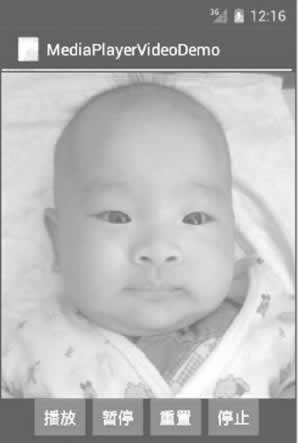
图 2 MediaPlayerVideoDemo的运行效果
对应的布局文件 main.xml 的内容如下:
<?xml version="1.0" encoding="utf-8"?> <LinearLayout xmlns:android="http://schemas.android.com/apk/res/android" android:layout_width="fill_parent" android:layout_height="fill_parent" android:orientation="vertical"> <SurfaceView android:id="@+id/surfaceView1" android:layout_width="fill_parent" android:layout_height="wrap_content" android:layout_weight="1.01" /> <LinearLayout android:id="@+id/linearLayout1" android:layout_width="match_parent" android:layout_height="wrap_content" android:gravity="center"> <Button android:id="@+id/button1" android:layout_width="wrap_content" android:layout_height="wrap_content" android:text="播放" /> <Button android:id="@+id/button2" android:layout_width="wrap_content" android:layout_height="wrap_content" android:text="暂停" /> <Button android:id="@+id/button3" android:layout_width="wrap_content" android:layout_height="wrap_content" android:text="重置" /> <Button android:id="@+id/button4" android:layout_width="wrap_content" android:layout_height="wrap_content" android:text="停止" /> </LinearLayout> </LinearLayout>
实例 MediaPlayerVideoDemo 的配置文件 AndroidManifest.xml 的内容如下:
<?xml version="1.0" encoding="utf-8"?> <manifest xmlns:android="http://schemas.android.com/apk/res/android" package="introduction.android.videoPlayDemo" android:versionCode="1" android:versionName="1.0"> <uses-sdk android:minSdkVersion="14" /> <application android:icon="@drawable/ic_launcher" android:label="@string/app_name"> <activity android:name=".VideoPlayDemoActivity" android:label="@string/app_name"> <intnt-filter> <action android:name="android.intent.action.MAIN" /> <category android:name="android.intent.category.LAUNCHER" /> </intnt-filter> </activity> </application> </manifest>
实例 MediaPlayerVideoDemo 中的主 Activity 文件MainActivity.Java 的代码如下:
package introduction.android.videoplaydemo; import java.io.IOException; import android.app.Activity; import android.media.AudioManager; import android.media.MediaPlayer; import android.os.Bundle; import android.util.Log; import android.view.SurfaceHolder; import android.view.SurfaceView; import android.view.View; import android.view.View.OnClickListener; import android.widget.Button; public class MainActivity extends Activity { /** * Called when the activity is first created. */ private Button playbtn; private Button pausebtn; private Button replaybtn; private Button stopbtn; private SurfaceView surview; private SurfaceHolder surHolder; private MediaPlayer mp; private String path = "sdcard/movies/movie.3gp"; protected boolean pause = false; @Override public void onCreate(Bundle savedInstanceState) { super.onCreate(savedInstanceState); setContentView(R.layout.main); surview = (SurfaceView) this.findViewById(R.id.surfaceView1); surHolder = surview.getHolder(); surHolder.setType(SurfaceHolder.SURFACE_TYPE_PUSH_BUFFERS); mp = new MediaPlayer(); mp.setOnCompletionListener(new MediaPlayer.OnCompletionListener() { @Override public void onCompletion(MediaPlayer mp) { // TODO Auto-generated method stub Log.i("mediaplayer", "播放完成"); } }); playbtn = (Button) this.findViewById(R.id.buttonl); playbtn.setOnClickListener(new OnClickListener() { @Override public void onClick(View argO) { // TODO Auto-generated method stub if (!pause) { //开始播放 mp.setAudioStreamType(AudioManager.STREAM_MUSIC); mp.setDisplay(surHolder); try { mp.setDataSource(path); mp.prepare(); mp.start(); } catch (IOException e) { // TODO Auto-generated catch block e.printStackTrace(); } } else { //暂停播放 mp.start(); pause = false; } } }); pausebtn = (Button) this.findViewById(R.id.button2); pausebtn.setOnClickListener(new OnClickListener() { //暂停播放 @Override public void onClick(View argO) { // TODO Auto-generated method stub if (mp != null) { pause = true; mp.pause(); } } }); replaybtn = (Button) this.findViewById(R.id.button3); replaybtn.setOnClickListener(new OnClickListener() { //重新播放 @Override public void onClick(View argO) { // TODO Auto-generated method stub if (mp != null) { mp.seekTo(0); } } }); stopbtn = (Button) this.findViewById(R.id.button4); stopbtn.setOnClickListener(new OnClickListener() { @Override public void onClick(View argO) { // TODO Auto-generated method stub if (mp != null) { mp.stop(); mp.release(); } } }); } }
联系信息:邮箱aoxolcom@163.com或见网站底部。







请登录后发表评论
注册
社交帐号登录