


借助于 Intent 可以轻松实现拨打电话的应用程序。只需声明一个拨号的 Intent 对象,并使用 startActivity() 方法启动即可。
创建 Intent 对象的代码为 Intent intent = new Intent(action,uri),其中 URI 是要拨叫的号码数据,通过 Uri.parse() 方法把“tel:1234”格式的字符串转换为 URI。
而 Action 有两种使用方式:
- Intent.Action_CALL。是直接进行呼叫的方式,这种方式需要应用程序具有 android.permission.CALL_PHONE 权限。
- Intent.Action_DIAL。不是不直接进行呼叫,而是启动 Android 系统的拨号应用程序,然后由用户进行拨号。这种方式不需要任何权限的设置。
实例 phoneDemo 演示了使用 Intent.Action_CALL 方式进行拨号的过程,运行效果如图 1 所示。
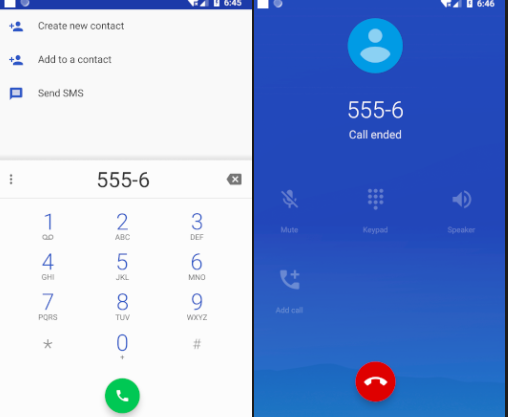
图 1 使用Intent.Action_CALL方式拨号
实例 phoneDemo 中 main.xml 的代码如下:
<?xml version="1.0" encoding="utf-8"?> <LinearLayout xmlns:android="http://schemas.android.com/apk/res/android" android:layout_width="fill_parent" android:layout_height="fill_parent" android:orientation="vertical"> <EditText android:id="@+id/edittext" android:layout_width="fill_parent" android:layout_height="wrap_content" android:layout_marginLeft="40dp" android:layout_marginTop="30dp" /> <Button android:id="@+id/button" android:layout_width="wrap_content" android:layout_height="wrap_content" android:layout_marginLeft="80dp" android:layout_marginTop="40dp" android:text="拨打电话" /> </LinearLayout>
实例 phoneDemo 中 AndroidManifest.xml 的代码如下:
<?xml version="1.0" encoding="utf-8"?> <manifest xmlns:android="http://schemas.android.com/apk/res/android" package="introduction.android.phonedemo"> <uses-permission android:name="android.permission.CALL_PHONE" /> <application android:allowBackup="true" android:icon="@mipmap/ic_launcher" android:label="@string/app_name" android:roundIcon="@mipmap/ic_launcher_round" android:supportsRtl="true" android:theme="@style/AppTheme"> <activity android:name=".MainActivity"> <intent-filter> <action android:name="android.intent.action.MAIN" /> <category android:name="android.intent.category.LAUNCHER" /> </intent-filter> </activity> </application> </manifest>
实例 phoneDemo 中 PhoneDemoActivity.java 的具体实现代码如下:
package introduction.android.phonedemo; import android.app.Activity; import android.content.Intent; import android.net.Uri; import android.os.Bundle; import android.view.View; import android.view.View.OnClickListener; import android.widget.Button; import android.widget.EditText; public class MainActivity extends Activity { /** * Called when the activity is first created. */ private Button button; private EditText edittext; @Override public void onCreate(Bundle savedInstanceState) { super.onCreate(savedInstanceState); setContentView(R.layout.activity_main); button = (Button) findViewById(R.id.button); button.setOnClickListener(new buttonListener()); } class buttonListener implements OnClickListener { @Override public void onClick(View v) { // TODO Auto-generated method stub edittext = (EditText) findViewById(R.id.edittext); String number = edittext.getText().toString(); Intent intent = new Intent(Intent.ACTION_CALL, Uri.parse("tel:" + number)); //startActivity(intent); } } }
其中:
Intent intent = new Intent(Intent.ACTION_CALL, Uri.parse(“tel:” + number));
startActivity(intent);
通过 Intent.ACTION_CALL 建立了一个进行拨号的 Intent 请求,并使用 startActivity 直接启动 Android 系统的拨号程序进行呼叫。
若在实例 PhoneDemo 中,将 PhoneDemoActivity.java 中的代码:
Intent intent=new Intent(Intent.ACTION_CALL,Uri.parse(“tel:”+number));
修改为:
Intent intent=new Intent(Intent.ACTION_DIAL,Uri.parse(“tel:”+number));
最后,单击“拨打电话”按钮后不再直接呼叫,而是只运行 Android 系统默认的拨号程序,用户还拥有进一步决定下一步操作的权限,运行效果如图 2 所示。
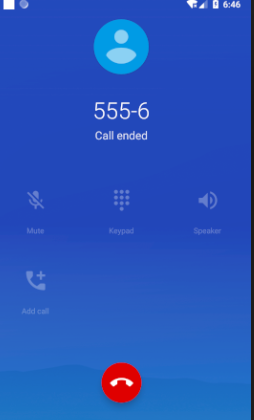
图 2 拨打电话
联系信息:邮箱aoxolcom@163.com或见网站底部。









请登录后发表评论
注册
社交帐号登录